

When a major story breaks, social platforms can be useful—and exhausting at the same time. Updates fly in every second, screenshots get reposted a thousand times, and the loudest opinions often travel faster than verified facts. If you’ve ever opened a trending topic “just to check what happened” and found yourself still scrolling 30 minutes later, you’re not alone.
The goal isn’t to avoid news. It’s about staying informed without letting a feed decide what you consume, how long you stay, or how you feel afterward. With a few small habit changes—and a cleaner way to view public profiles—you can get the signal you need and move on with your day.
When trending events overwhelm your attention
Breaking news creates a unique kind of overload: not simply “too much information,” but too much repeated information. The same clip gets posted by hundreds of accounts. The same quote is reframed into countless takes. Context is scattered across threads, replies, and quote posts that may or may not be trustworthy.
That repetition has a cost. It increases emotional fatigue, makes it harder to spot what’s actually new, and encourages reactive reading. The feed becomes a loop: you scroll to find the next meaningful update, but most of what you see is amplification, not information.
A calmer approach starts with one decision: reduce inputs. Instead of “following the trend,” focus on a small set of sources you trust, and read what they actually posted—cleanly, quickly, and without distractions.
Why a neutral reading environment helps you find the signal faster
For many people, the problem isn’t the existence of public posts. It’s everything wrapped around them: suggestions, unrelated content, engagement bait, and “you might like” detours that pull you away from what you came to read.
A neutral reading environment helps in three ways:
First, it supports intentional reading. You can view a specific account’s timeline and stay on task, rather than being guided into whatever the algorithm predicts will keep you scrolling.
Second, it reduces distraction. Less visual clutter and fewer side quests make it easier to skim for facts—dates, statements, and links—before you absorb interpretations and opinions.
Third, it’s privacy-comfortable. When you’re logged in, what you click and how long you linger can shape future recommendations. Some users prefer reading public information without feeling like they’re building an “interest trail” that follows them later.
A profile-first workflow for staying informed
If you want to understand a fast-moving story without getting pulled into chaos, try this profile-first workflow:
Start with one primary source. This could be an official account, a reputable journalist, or an organization known for corrections and transparent sourcing. Your job in the first pass is not to absorb every opinion—it’s to identify what’s confirmed.
Next, scan their recent timeline for:
• clear statements (what is known vs. unknown),
• time markers (when something happened or was updated),
• and links to original materials (press releases, official pages, or published documents).
Then cross-check with a second independent source. This is where you confirm whether an update is widely supported or just circulating because it’s emotionally compelling. Two strong sources beat dozens of weak ones.
This approach has a hidden benefit: it dramatically reduces time spent. You don’t need to “keep up with everything.” You need to understand enough to be accurate.
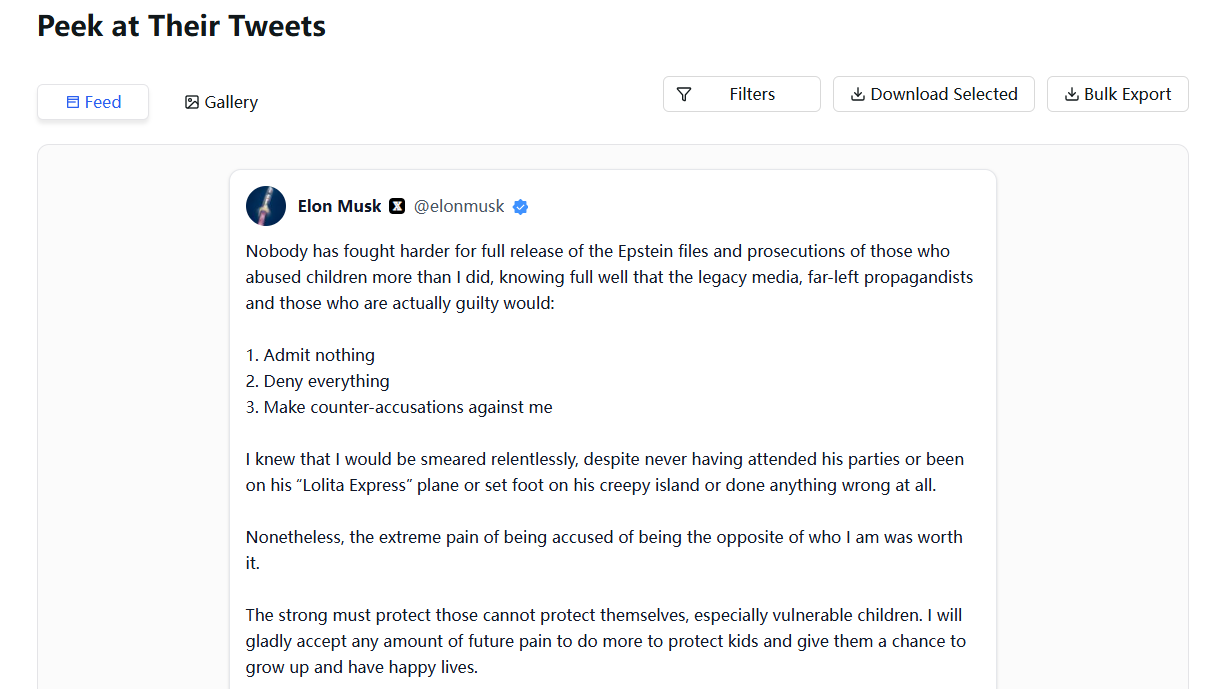
How Twitter Viewer supports minimal, profile-based reading
This is where Twitter Viewer fits into a healthier reading routine.
Twitter Viewer is built for lightweight, profile-first viewing of public content. Instead of pushing you toward endless browsing, it helps you do something simpler: open a public profile, read the timeline, and leave when you’ve found what you need.
Because the experience is designed around quick access and clarity, it’s especially useful when:
• you want to check one account’s posts without extra clutter,
• you’re switching between devices (desktop and mobile),
• or you’re trying to stay focused during a high-noise moment.
Just as important, the positioning matters: this is a reading utility for publicly available content—not a workaround tool, not a “hack,” and not a way to access restricted content.
Quick walkthrough: verify context using a clean profile view
Here’s a practical way to use a profile-first approach during a trending event:
Open the profile you trust. Don’t begin with viral reposts or anonymous screenshots. Begin with the account most likely to publish corrections, citations, or official links.
Skim the recent posts for what’s actually new. Look for timestamps, updated statements, and references to original sources. Often, the key information is contained in a small number of posts, while the rest of the feed is repetition.
Save what matters and exit. If a link or quote is important, copy it into your notes and move on. The biggest productivity gain comes from not “staying in the feed.”
Finally, compare one key claim with a second credible source. If both align, you can be more confident. If they don’t, you know exactly what requires more verification.
Digital wellbeing: small rules that stop doomscrolling
A tool helps, but habits matter more. If you want to stay informed without losing time, try a few simple rules:
Time-box your session. Give yourself five to ten minutes. When time is up, stop. If you need more, schedule a second short session later.
Limit sources. Two reliable profiles are often enough to understand the core facts. More sources can create the illusion of certainty while actually adding noise.
Practice “save and return.” When something feels urgent, you’re more likely to scroll reactively. Saving links for later gives you control back.
These aren’t moral rules—they’re practical boundaries. Your attention is limited, and you don’t need a feed to use it.
Responsible use and disclaimer
Twitter Viewer provides access to publicly available information. It is an independent tool and is not affiliated with X. It does not enable access to private or restricted content.
Try it free
If you want a cleaner way to read public profiles during high-noise moments, try Twitter Viewer free and use a profile-first workflow: open a reliable account, skim for verified updates, save what matters, and exit.


