

People search for how to see Twitter history for many different reasons. Some want to find an old tweet they posted years ago. Others are trying to review what a public account shared during a specific period. In many cases, users simply want a clearer way to browse past tweets without digging through endless timelines or downloading large data files.
Twitter does provide official ways to access historical content, but those options are often designed for account management rather than everyday viewing. Understanding what each method is good for—and where it falls short—is the key to choosing the right approach.
What “Twitter History” Usually Means
Before looking at tools or methods, it helps to clarify what people usually mean by “Twitter history.” In practice, this term often refers to one of three things.
First, it can mean your own past tweets, replies, and media posts. Second, it may refer to tweets from a specific date range, such as content shared last year or during a particular event. Third, many users mean the public posting history of an account, whether their own or someone else’s.
These are not all handled the same way on Twitter, and that difference explains why many users feel frustrated when trying to look back.
Native Ways to See Twitter History
Twitter’s built-in tools are reliable, but each one is designed with a specific purpose in mind.
The most obvious option is scrolling through a profile timeline. This works reasonably well for recent tweets, but it quickly becomes inefficient for older accounts. Finding content from several years ago often means a lot of manual scrolling with little control over dates or context.
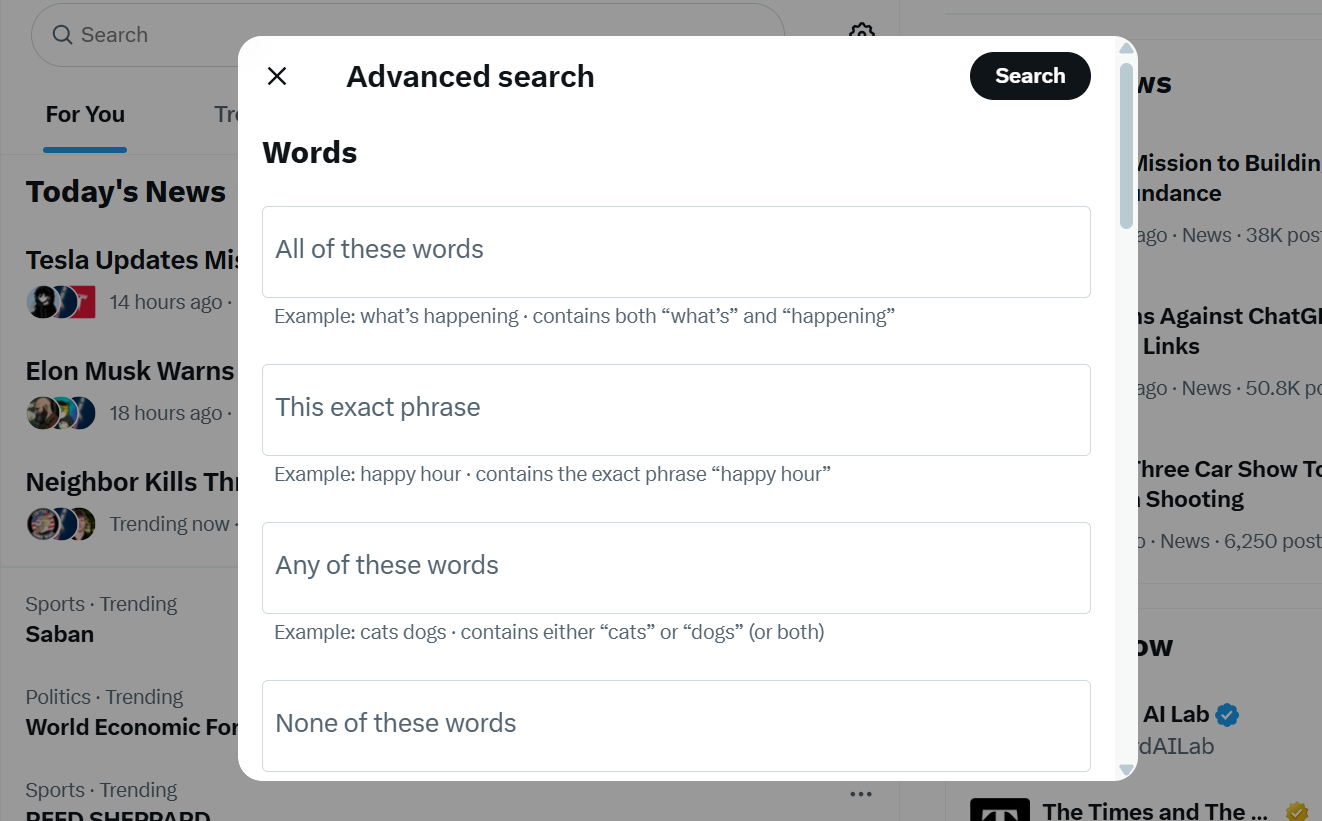
Search is more powerful. Using Twitter’s search bar or its advanced search interface allows you to filter tweets by username, keywords, and time ranges. For many users, this is the fastest official way to locate older tweets without scrolling endlessly. You can access the Advanced Search page directly at
https://twitter.com/search-advanced.
However, the search still requires some effort. You need to know what keywords to use, how date filters work, and which tweets are still publicly available. If a tweet has been deleted or restricted, it will not appear in results.
For a complete record of your own activity, Twitter also offers the option to download your account archive. This archive contains all tweets, replies, likes, and account data associated with your profile. While comprehensive, it is designed for data ownership and record-keeping, not casual browsing. Opening and navigating archive files can feel heavy if your goal is simply to review past tweets.
All of these methods are official and trustworthy. At the same time, they are not optimized for fast, intuitive exploration of public tweet history.
Where These Methods Start to Break Down
Most people searching for how to see Twitter history are not trying to manage account data or perform forensic analysis. They simply want to review public tweets—what was posted, when it was posted, and how an account’s content has evolved.
This is where friction appears. Timeline scrolling is slow. Search requires syntax and trial-and-error. Archives are thorough but cumbersome. None of these options is designed for quick, distraction-free browsing of public content.
That gap is important because it explains why users keep looking for alternatives even after learning about Twitter’s native tools.
A Faster Way to Review Public Twitter History
When the goal is to review public tweet history, rather than export data or manage an account, a different approach makes more sense.
This is where twitter-viewer fits naturally into the picture.
Instead of focusing on data ownership or internal account records, twitter-viewer is designed around one simple idea: viewing publicly available tweets in a clean and straightforward way. It works only with content that is already public on Twitter. It does not access private data, protected accounts, or internal activity logs.
For users who want to browse older tweets from a public account, revisit past posts, or understand an account’s visible history at a glance, this approach often feels more practical than relying on timelines, search operators, or full archive downloads. It complements Twitter’s official tools rather than replacing them, by focusing specifically on the viewing experience.
What You Cannot See on Twitter (and Why)
It is equally important to understand Twitter’s limits.
Twitter does not provide a history of tweets you have viewed. It does not offer a complete, long-term log of all your searches. And it does not allow native access to deleted tweets or private account content. These restrictions are intentional and part of how the platform protects user privacy.
Any method that claims to bypass these limits should be approached with caution. Public history is not the same as private or deleted data, and the distinction matters.
How Public History Fits Into Twitter’s Visibility Model
Twitter operates on a clear visibility boundary. Public tweets remain viewable unless they are deleted or restricted. Private actions and internal logs remain inaccessible. Aggregate metrics may show trends, but they do not reveal individual behavior.
Understanding this boundary makes it easier to decide which method to use. If you want to manage or export your own data, official tools are the right choice. If you want to see what is already public, focusing on viewing-oriented approaches is often more efficient.
Final Thoughts
So, how do you see Twitter history in practice? The answer depends on what you are trying to achieve.
If you need official records or full account data, Twitter’s archive and search tools are appropriate. If your goal is simply to review public tweets—quickly, clearly, and without unnecessary complexity—viewing-focused approaches are often a better fit.
Knowing the difference helps you choose the right method and avoid expecting Twitter to provide data it was never designed to show.


